
Phone:
+86-15218865186

Views: 0 Author: Site Editor Publish Time: 2025-12-04 Origin: Site


Industrial fan motors are the backbone of many industrial and commercial systems. From HVAC units and cooling systems to exhaust fans and ventilation systems, these motors ensure efficient airflow, temperature control, and overall system performance. However, like any mechanical system, industrial fan motors can experience issues that hinder their performance. Understanding how to troubleshoot common industrial fan motor problems is crucial to minimizing downtime, preventing costly repairs, and ensuring the smooth operation of your equipment.
In this article, we will cover the most common industrial fan motor problems, their causes, and how to troubleshoot them effectively. Whether you're a technician, engineer, or facility manager, this guide will provide practical solutions to help you maintain your industrial fan motors and keep your systems running efficiently.
Before diving into the troubleshooting process, it's essential to understand some of the typical issues that can affect industrial fan motors. These problems can arise due to various factors, including electrical issues, mechanical failure, or environmental conditions. Here are some common problems:
Motor Not Starting
Overheating
Unusual Noise or Vibration
Low Airflow
Excessive Power Consumption
Motor Running Too Slow or Too Fast
Motor Sparking or Smoking
Faulty Bearings
Tripped Circuit Breakers
Electrical Faults
Now, let's break down each of these issues and go through the troubleshooting steps.
If the motor fails to start, it can halt the operation of the entire system, leading to downtime and possible delays in your operations. There are several potential causes for this issue.
Power Supply Issues: The motor may not be receiving the correct voltage or current, or the power supply might be turned off.
Tripped Circuit Breaker: If the motor is overloaded or experiencing electrical faults, the circuit breaker may trip, cutting off the power.
Faulty Motor Capacitor: In some types of motors, a faulty capacitor can prevent the motor from starting.
Check the Power Supply: Ensure that the motor is receiving power. Check the power switch, fuses, and wiring for any visible damage. If the motor is connected to a control panel, verify that the system is powered on.
Inspect the Circuit Breaker: If the circuit breaker has tripped, reset it and check if the motor starts. If the breaker trips again, there may be an issue with the motor or the electrical circuit, such as a short circuit or overload.
Test the Capacitor: If the motor uses a capacitor, test it for continuity. A faulty capacitor can prevent the motor from starting. If it's damaged, replace it with the correct type and rating.
Check the Motor Windings: Use a multimeter to check the resistance of the motor windings. If the windings are open or shorted, the motor will need to be replaced or repaired.
Overheating is a common problem in industrial fan motors, and it can lead to permanent damage if not addressed quickly. An overheated motor can result in the breakdown of insulation and other components, reducing the motor’s lifespan.
Overloading: The motor may be operating beyond its rated capacity, causing it to overheat.
Poor Ventilation: Insufficient airflow around the motor can trap heat and prevent proper cooling.
Electrical Imbalance: An imbalance in the electrical supply can cause the motor to draw excessive current and overheat.
Faulty Bearings: Worn bearings can create additional friction, causing the motor to work harder and overheat.
Check for Overloading: Verify that the motor is not under an excessive load. Compare the fan system’s requirements with the motor’s specifications to ensure it's suitable for the application.
Inspect Ventilation: Make sure the motor has proper ventilation. Check for obstructions around the motor or fan housing that could impede airflow. Clean any dirt or dust from ventilation openings.
Check Electrical Supply: Ensure that the motor is receiving the correct voltage and current. Use a multimeter to measure the input voltage and compare it to the motor’s specifications.
Examine Bearings: Check the motor’s bearings for signs of wear or damage. If the bearings are faulty, replace them to reduce friction and prevent overheating.
Industrial fan motors are designed to operate smoothly, but if they start making unusual noises or vibrating excessively, this could indicate an underlying issue.
Unbalanced Fan Blades: If the fan blades are unbalanced, they can cause vibration, which in turn affects the motor.
Worn Bearings: Bearings that are worn or damaged can produce noise and cause vibration.
Loose Parts: Loose motor mounts or fan blades can lead to noise and vibration.
Motor Misalignment: If the motor shaft is misaligned with the fan blades, it can cause wobbling and excessive vibration.
Check Fan Blade Balance: Inspect the fan blades for any signs of damage or imbalance. Clean any dust or debris from the blades and ensure they are securely attached to the motor shaft.
Inspect Bearings: If the motor is making a grinding or squealing noise, the bearings may be worn. Replace any damaged bearings to restore smooth operation.
Tighten Loose Parts: Check all fasteners, including motor mounts and blade attachments. Tighten any loose bolts or screws to eliminate vibrations.
Align the Motor: Ensure the motor is properly aligned with the fan blades. Misalignment can lead to uneven stress on the motor and increased vibration.
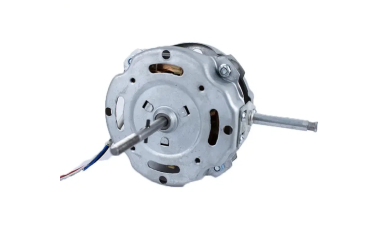
Low airflow can significantly reduce the efficiency of a ventilation system or cooling system. If your industrial fan is running but not producing adequate airflow, there may be several factors at play.
Clogged Air Filters: A dirty or clogged air filter can restrict airflow, causing the motor to work harder.
Obstructions in the Ductwork: Debris or dirt buildup in the ductwork can obstruct airflow, reducing the fan’s efficiency.
Motor Speed Issues: If the motor is not running at the correct speed, it may not be able to generate the necessary airflow.
Fan Blade Damage: Damaged or worn fan blades can reduce airflow and performance.
Clean the Air Filter: Check and clean or replace the air filter if it is clogged. This will allow air to flow freely and improve the efficiency of the system.
Inspect Ductwork: Check the ductwork for any blockages, dirt buildup, or damage. Clean out any obstructions to restore proper airflow.
Measure Motor Speed: Use a tachometer to measure the motor speed and compare it to the motor’s specifications. If the motor is running too slow, check the electrical supply and ensure the motor is receiving the correct voltage.
Inspect Fan Blades: Check the fan blades for cracks or signs of damage. Replace any damaged blades to restore proper airflow.
If the motor is drawing more power than usual, it could be a sign that something is wrong with the motor or the system it’s powering.
Electrical Imbalance: A poor electrical supply can cause the motor to draw excessive current.
Overloading: If the motor is running at a higher load than it’s designed for, it will consume more power.
Worn Bearings: Faulty bearings can create additional friction, forcing the motor to work harder and consume more power.
Check Electrical Supply: Use a multimeter to measure the input voltage and current. Make sure the motor is receiving the correct power supply as specified by the manufacturer.
Check for Overloading: Verify that the motor is not under excessive load. Reduce the load on the motor if necessary to prevent power overdraw.
Inspect Bearings: Worn or damaged bearings can increase the motor’s energy consumption. Replace any faulty bearings to reduce friction and improve efficiency.
A motor that is running too slow or too fast may not be providing the correct airflow or ventilation, compromising system performance.
Voltage Imbalance: If the motor is receiving an incorrect voltage, it may run too fast or too slow.
Faulty Capacitor: In some motors, a faulty capacitor can cause the motor to operate at an incorrect speed.
Speed Control Issues: If the motor has a speed control system, there may be an issue with the control mechanism.
Check Voltage: Use a multimeter to check the voltage supplied to the motor. If the voltage is incorrect, you may need to adjust the power supply.
Inspect the Capacitor: A faulty capacitor can cause speed issues. Test the capacitor for proper function and replace it if necessary.
Check Speed Control Settings: If the motor uses a variable speed control system, ensure that the settings are correct. If there’s a fault in the control system, repair or replace the faulty components.
Sparking or smoking from the motor can indicate severe issues such as electrical failure or overheating, and immediate attention is required to avoid damage.
Overheating: If the motor is running too hot, it may cause insulation to break down, leading to sparking.
Electrical Faults: Short circuits or faulty wiring can cause sparks or smoke.
Worn Brushes: In motors that use brushes, worn or damaged brushes can cause sparking.
Turn Off the Power: If you notice sparking or smoking, turn off the power immediately to prevent further damage.
Check for Overheating: Inspect the motor for signs of overheating, such as burned areas or melted insulation. If overheating is the issue, address the root cause, such as poor ventilation or overloading.
Inspect Electrical Wiring: Check the wiring for any signs of shorts or damage. Repair or replace any faulty wiring.
Inspect Brushes: If the motor uses brushes, check them for wear. Replace any worn brushes to stop sparking.
Troubleshooting common industrial fan motor problems requires a systematic approach to identify the root cause and apply appropriate solutions. By following the troubleshooting steps outlined in this article, you can diagnose and resolve many of the most common issues that affect industrial fan motors. Regular maintenance, proper monitoring, and prompt attention to problems are key to ensuring the longevity and reliable performance of your fan motors. With the right tools and knowledge, you can keep your systems running smoothly, avoiding costly repairs and downtime.

| 206,207,208, No. 4, Lijun Road, Xili Industrial Zone, Shatou Street, Guangzhou, Guangdong, China |